Digital Travel Companions
There is nothing quite like the thrill of packing light and heading to the airport. But every seasoned traveler knows the struggle of the "in-between" moments—the long layovers, the train rides with spotty WiFi, or those quiet rainy evenings in a hostel.
We love playing classic games like Cribbage and Yahtzee to pass the time, but let’s be honest: carrying a wooden cribbage board adds unnecessary bulk to your carry-on, and finding a fresh scorepad in a foreign country is a hassle.
That is why Rob created two lightweight digital tools designed specifically for the traveler who wants to play without the clutter.
We love playing classic games like Cribbage and Yahtzee to pass the time, but let’s be honest: carrying a wooden cribbage board adds unnecessary bulk to your carry-on, and finding a fresh scorepad in a foreign country is a hassle.
That is why Rob created two lightweight digital tools designed specifically for the traveler who wants to play without the clutter.

The Cribbage Scorer
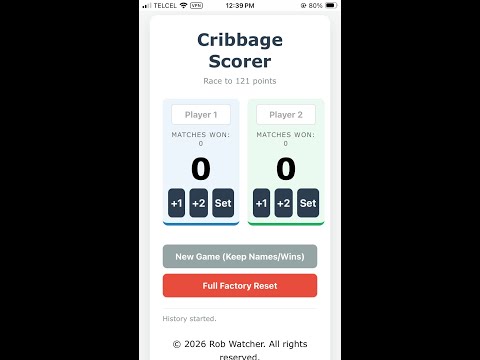
First up is the Cribbage Scorer. This isn't just a calculator; it replaces the physical board entirely. Whether you are squeezing in a game on a tray table or relaxing at a beachside bar, this app handles the race to 121 points seamlessly.
It features tap-friendly buttons (perfect for when the train is bumping around) and a smart "Set" feature that brings up a numeric keypad for quick entry of high-scoring hands. Best of all, it tracks your Match Wins over time, so you can finally settle the debate of who is the true Cribbage champion of the trip. Just make sure to bring along a deck of cards (what serious traveller doesn’t do that LOL).
First up is the Cribbage Scorer. This isn't just a calculator; it replaces the physical board entirely. Whether you are squeezing in a game on a tray table or relaxing at a beachside bar, this app handles the race to 121 points seamlessly.
It features tap-friendly buttons (perfect for when the train is bumping around) and a smart "Set" feature that brings up a numeric keypad for quick entry of high-scoring hands. Best of all, it tracks your Match Wins over time, so you can finally settle the debate of who is the true Cribbage champion of the trip. Just make sure to bring along a deck of cards (what serious traveller doesn’t do that LOL).
The Yahtzee Scoreboard
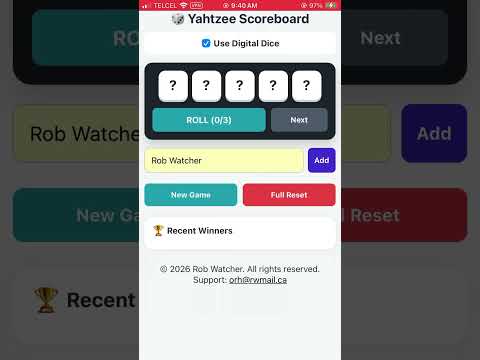
Next is the Yahtzee Scoreboard. We all know the pain of doing mental math after a long day of sightseeing. This app acts as your digital scorepad. You simply tap the category, enter your dice roll, and it handles the rest.
It automatically calculates the Upper Section Bonus (no more arguing if you reached 63 points!) and totals up your score instantly. It keeps the game fast, fun, and completely paperless.

The Best Feature: Works Offline
Here is the best part for us travelers: You do not need the internet to use them.
These tools are built as Progressive Web Apps (PWAs). This means they live on the web, but once you open them on your phone, they save themselves to your device. You can be at 30,000 feet in Airplane Mode or hiking in a remote dead zone, and these apps will launch and function perfectly.
Here is the best part for us travelers: You do not need the internet to use them.
These tools are built as Progressive Web Apps (PWAs). This means they live on the web, but once you open them on your phone, they save themselves to your device. You can be at 30,000 feet in Airplane Mode or hiking in a remote dead zone, and these apps will launch and function perfectly.
How to Install on Your Home Screen
You won't find these in the App Store or Play Store. They are direct-download web apps. Here is how to get them onto your phone instantly:
For iPhone (iOS):
For Android:
Once installed, they look and feel just like native apps, removing the browser bar to give you a full-screen experience.
Get Them Now
Ready to upgrade your travel game kit? Access them completely free here:
You won't find these in the App Store or Play Store. They are direct-download web apps. Here is how to get them onto your phone instantly:
For iPhone (iOS):
- Open the link in Safari.
- Tap the Share icon (the square with the arrow pointing up).
- Scroll down and tap Add to Home Screen.
- Tap Add.
For Android:
- Open the link in Chrome.
- Tap the three dots in the top corner.
- Tap Install App or Add to Home Screen.
Once installed, they look and feel just like native apps, removing the browser bar to give you a full-screen experience.
Get Them Now
Ready to upgrade your travel game kit? Access them completely free here:

Scan to read on mobile